Showing posts with label Pathway. Show all posts

Tuesday, 24 November 2015

Testing for Non-Testers Pathway

This pathway is designed to help non-testers tackle testing activities. If you're asked to test something in your team, this is a set of practical resources to help you.

There are a variety of steps that you may approach linearly or by hopping about to those that interest you most. It is a little different to the other testing pathways as it is:
  • Specifically for non-testers
  • Designed to help people with immediate questions like "How do I decide what to test?"
  • Does not include exercises, instead assuming that the provided resources will be applied in practical situations within your development team

STEP - Why non-testers should be involved in testing

Agile development teams generally seek shared ownership of quality. In order to achieve this, the tester may have to yield some control and others in the team may need to be more willing to pick up testing activities. These teams want to move away from the tester as the only person who tests, towards an environment where the tester leads testing and empowers others to contribute too. These articles describe the shift in thinking towards testing as a shared activity:

STEP - How to make an application testable

As developers and business analysts, the easiest first step to aid testing of the product is to understand the attributes that make it testable. Changing the way you specify solutions and design software can have significant impact on a tester's ability to verify and explore what is delivered. Learn to consider the various facets of testability:

STEP - How to decide what to test

When asked to pick up a testing task, the non-tester may wonder where to begin. Testers are often poor at explaining how they test an application, which can make testing seem like magic. In fact, testers will have their own set of testing heuristics, whether they can articulate them or not! Fortunately there are resources that provide common test heuristics to help you determine which tests you'd like to perform, or prompt you to think of your own ideas beyond these boundaries:

STEP - How to document your test ideas

One deterrent for a non-tester to test may be your perception of the amount of documentation required. Within your development team, the testers are likely to have an approach that you can adopt. However there may be freedom for you to utilize lightweight documentation to map out your thinking. Perhaps to simplify what you need to do, a tester might transfer your results into the wider ecosystem of test artifacts afterwards. These articles give practical examples of using mind mapping software for test planning and execution:

STEP - What to think about while testing

Testing isn't just about picking up and blindly applying the heuristics of others. When interacting with the software you may also want to consider what user persona to adopt, what bugs to raise, and what test evidence to collect. Though many of these decisions will be driven by collaborative interaction with your development team, these resources may help you understand the possible compromises being made and approaches that are possible:

STEP - How to debrief

A key aspect of getting non-testers to pick up test activities is following up with a post-testing debrief. This provides an opportunity for the tester and the non-tester to sit together and spend a few minutes discussing the testing activity that has occurred. These resources provide common questions that may be asked during a debrief:

STEP - Where to automate

Finally, you may be asked to contribute towards automation. Agile teams will usually require automated checks to support their rapid delivery cycles so that testers have time to understand new functionality, explore the application and find interesting problems. These articles describe factors to consider when determining what to automate, where to implement and how to interpret the results:

Sunday, 27 September 2015

Security Testing Pathway

This pathway is a tool to help guide your self development in security testing. It includes a variety of steps that you may approach linearly or by hopping about to those that interest you most.

Each step includes:
  • links to a few resources as a starting point, but you are likely to need to do your own additional research as you explore each topic.
  • a suggested exercise or two, which focus on reflection, practical application and discussion, as a tool to connect the resources with your reality.

Take your time. Dig deep into areas that interest you. Apply what you learn as you go.

This pathway was developed in conjunction with Daniel Billing & Sarah Burgess


STEP - Introduction to oWASP

The Open Web Application Security Project (OWASP) is a worldwide not-for-profit charitable organisation focused on improving the security of software. Understand the breadth of information and resources available on the oWASP site:
EXERCISE
[1 hour] The volume of information available on the oWASP site can be overwhelming. The resources on the site are a product of thousands of active wiki users, however the aspects of security that your organisation prioritises will depend on the views of individuals. To bring your focus back to what is relevant for your context, talk to someone in your team about security. You may like to find out:
  • What security testing does your organisation currently prioritise? Why? 
  • Have you been attacked in the past? In what way? 
  • How are developers preventing vulnerabilities in your applications?


STEP - Threat Modelling

Understand how threat modeling can help clarify risks to the organisation:
EXERCISE
[1 hour] Use the STRIDE model to think about threats to your application. Try to get specific about the ways in which your organisation is vulnerable to each threat. Share your thinking with a security specialist or technical lead, see if you can add anything extra to your threat model with their help.


STEP - Approach to security testing

Learn about how others plan security testing and integrate it into their development process:
EXERCISE
[1 hour] Talk to your team about who is currently responsible for security testing and how it is integrated into your existing development process. Talk to a technical lead or coach about the opportunities for improving what you do now.


WARNING: In many countries it is illegal to use the following attacks. Please make sure that you practice your security testing skills in the demonstration environments specified in the exercises only.


STEP - SQL injection attack

Injection flaws occur when untrusted data is sent to an interpreter as part of a command or query. The attacker’s hostile data can trick the interpreter into executing unintended commands or accessing data without proper authorization. Understand more about SQL injection:
EXERCISES
[1 hour] Work through the exercises in how to exploit a SQL injection attack. Using this intentionally vulnerable demonstration site, you should learn how to gain unauthorised access to an application, find user account and password details, and discover details of the underlying database.

[1 hour] The Altoro Mutual website is published by Watchfire, Inc. for the sole purpose of demonstrating the effectiveness of Watchfire products in detecting web application vulnerabilities and website defects. Based on what you’ve learned, how many ways can you gain access to the application using SQL injection? If you’re unsure where to begin, you may wish to try the Online Banking Login form as a starting point for your attack.


STEP - Cross site scripting attack

Cross site scripting, or XSS, flaws occur whenever an application takes untrusted data and sends it to a web browser without proper validation or escaping. XSS allows attackers to execute scripts in the victim’s browser which can hijack user sessions, deface web sites, or redirect the user to malicious sites. Understand more about XSS:
EXERCISE
[2 hours] Gruyere is an application with a number of security vulnerabilities for use as a learning tool. Using a Firefox browser, start up your own instance of Gruyere and try to complete the XSS Challenges. Each challenge includes hints to help you expose the vulnerabilities independently, then explains one way to exploit and fix the problems in the application.


STEP - Exploiting authentication and session management

Application functions related to authentication and session management are often not implemented correctly, allowing attackers to compromise passwords, keys, or session tokens, or to exploit other implementation flaws to assume other users’ identities.
EXERCISE
[3 hours] For this exercise you’ll need a proxy application that allows you to capture, edit and resubmit network traffic. You may wish to download Fiddler, ZAP, Burp Suite, or use another tool of your choice.

Use the deliberately insecure Supercar Showdown website, complete the following challenges:
  1. Spoof another user’s session and perform actions against their user account
  2. Elevate your access privileges from a standard user to an administrative user
  3. Attempt to reset the password of another user
Some assistance for these challenges may be found in the Hack Yourself First course materials in the section on Account Management.


STEP - Practice makes perfect

The previous steps give information and exercises for the Top 3 attacks in the oWASP Top 10. All of the vulnerable learning environments provided so far are susceptible to these attacks in some way.

EXERCISE
[8 hours] Take the opportunity to practise the three types of exploit that have been introduced in this pathway: SQL injection attacks, XSS attacks, and authentication exploitation. Re-visit each learning environment and see how many additional vulnerabilities you can discover:


STEP - Serious security

Security testing is a rich, specialised discipline. Beyond this taster of what’s possible, there are a number of other aspects of application security to consider:
EXERCISE
[8 hours] If you’d like to get deeper into security testing, the next logical step is to run your own vulnerable learning environment. oWASP WebGoat aims to provide a de-facto interactive teaching environment for web application security. The application must be downloaded and installed on a local web server, the user guide includes instructions. When running the application, your machine will be very susceptible to attack and should disconnected from the internet. WebGoat is for educational purposes and it includes a number of lesson plans to teach the different aspects of application security.

Tuesday, 15 September 2015

Continuous Delivery Testing Pathway

This pathway is a tool to help guide your self development in continuous delivery testing. It includes a variety of steps that you may approach linearly or by hopping about to those that interest you most.

Each step includes:
  • links to a few resources as a starting point, but you are likely to need to do your own additional research as you explore each topic.
  • a suggested exercise or two, which focus on reflection, practical application and discussion, as a tool to connect the resources with your reality.

Take your time. Dig deep into areas that interest you. Apply what you learn as you go.


STEP - Removing release testing

Why does this pathway exist? Understand the key reasons to significantly shorten a release process, the arguments against release testing and why organisations aim to avoid batched releases in agile environments:
EXERCISE
[2 hours] Research your existing release process and talk to people within your organisation to find out whether there are any current initiatives to improve it.


STEP - Introduction to continuous delivery

What is the end goal? Discover the basics of continuous delivery and the theory of how it can be implemented in organisations.
EXERCISE
[1 hour] Based on what you've read, try to explain the theory of continuous delivery in your own words to someone in your team. Describe what appeals to you about continuous delivery, what you disagree with, and things that you think will be difficult to implement in your organisation. Afterwards, if you have any remaining questions, raise these with a technical lead or coach for further discussion.


STEP - Experiences in continuous delivery

How are other organisations doing continuous delivery? There is a lot of variance in implementation and differing opinions about how to approach the theory. Understand the realities of the people, processes and tools of teams doing continuous delivery:
EXERCISE
[2 hours] Compare the experiences shared in the links above and the theory of continuous delivery. Identify common themes, and areas where ideas or implementation details differ. Discuss your analysis with a technical lead or coach.


STEP - Starting with continuous integration

What is the first step? Understand the concept of continuous integration:
EXERCISE
[3 hours] At the start of this talk transcript, Jez Humble points out that most people aren't doing continuous integration. How does the approach to continuous integration in your team differ to the theory? Talk to a developer to confirm your understanding of your branching strategy, the way you use source control management tools, and how you manage merging to master. If you use a continuous integration tool, create a list of the jobs that are used by your team during development, and be sure that you understand what each one does. Reflect on how quickly your team respond to build failures in these jobs, and who takes ownership for resolving these. Discuss this exercise with a technical lead or coach to collaboratively identify opportunities for improvement, then raise these ideas at your next team retrospective.


STEP - Theory of test automation

Continuous delivery puts a lot of focus on test automation. In order to support development of an effective pipeline it's important to understand common strategies for automation, and the distinction between checking and testing:
EXERCISE
[1 hour] Read through the automation strategy for your product. How well does your existing strategy for automation support your delivery pipeline? What opportunities exist to improve this strategy? Discuss your thoughts with a technical lead or coach.


STEP - A delivery pipeline

Understand how to construct delivery pipeline and the role of automation:
EXERCISE
[3 hours] Create a visual representation of the current delivery pipeline for your product. Use a timeline format that shows the build jobs in your continuous integration tool at every stage from development through to production deploy, any test jobs that execute automated suites, and points where the tester is hands-on, exploring the product. Compare your pipeline to the simplified images by Yassal Sundman for continuous delivery and continuous deployment, then reflect on the following questions:
  1. How would your approach to testing change, or not, if we were able to deploy to production 10 times a day? How about 100 times a day?
  2. Does the coverage provided by your automation give you a degree of comfort or confidence? If not, what needs to change?
  3. Does your automation execute fast enough? How fast do you think it should be? How can you achieve this?
  4. Where in the pipeline would you want to retain hands-on testing? How would you justify this?
Discuss your ideas with a technical lead or coach. Work together to identify actions from your thinking and determine how to proceed in implementing change.


STEP - Non-functional testing in continuous delivery

Learn more about integrating security, performance, and other non-functional testing in a continuous delivery pipeline:
EXERCISE
[2 hours] Does your organisation have a non-functional testing "sandwich"? Having read more about organisations who integrate these activities earlier in the process, what opportunities do you see to improve the way that you work? What would the first steps be? Talk to a technical lead or coach about what you'd like to see change.


STEP - Cross-browser testing

For continuous delivery of a web application, it's important to include cross-browser testing in the delivery pipeline. Discover strategies for cross-browser testing and the tools available to support it:
EXERCISE
[8 hours] Learn more about the common cross-browser tools that are available, understand the advantages and disadvantages of each option, then select a tool to trial. Create a prototype to execute existing browser-based automation for your product across multiple browsers. If successful on your local environment, attempt to create a prototype job in your continuous integration tool to verify that your chosen solution works as part of your continuous integration. Discuss what you learned about the tool and the results of your experiment with a technical lead or coach.


STEP - Test data & databases

Discover the additional considerations around test data in continuous delivery:
EXERCISES
[1 hour] Data is a constant headache for testers. Consider the limitations of the test data in use by your automation. How could you improve the data within your delivery pipelines? How could you improve the way that you locate data for testing? Talk through your ideas with a technical lead or coach.


STEP - Configuration management & environments

An effective delivery pipeline is supported by multiple test environments. Learn more about configuration management, environments and infrastructure services in continuous delivery:
EXERCISES
[1 hour] Talk to your operations or support team about how they provide test environments for continuous integration, the infrastructure required to support a delivery pipeline, and what their plans are for future changes in this space.


STEP - Testing in production

Understand A/B testing and feature toggles:
EXERCISE
[1 hour] Talk to people in your organisation to find out how you currently use feature toggles and how you make decisions about what to keep based on user analytics. Could your approach be more responsive through targeted use of a monitoring tool like splunk? Share your thoughts with a technical lead or coach.

Tuesday, 8 September 2015

API, Web Services & Microservices Testing Pathway

This pathway is a tool to help guide your self development in API, web services and microservices testing. It includes a variety of steps that you may approach linearly or by hopping about to those that interest you most.

Each step includes:
  • links to a few resources as a starting point, but you are likely to need to do your own additional research as you explore each topic.
  • a suggested exercise or two, which focus on reflection, practical application and discussion, as a tool to connect the resources with your reality.

Take your time. Dig deep into areas that interest you. Apply what you learn as you go.


STEP - Distinguishing APIs and web services

An API (Application Programming Interface) is the means by which third parties can write code that interfaces with other code. A Web Service is a type of API that:
  • is used to exchange data between applications,
  • uses a standard defined by W3C, 
  • has an interface that is depicted in a machine-processable format usually specified as a WSDL (Web Service Description Language), and 
  • almost always operates over HTTP.
Example web service protocols include SOAP, REST, and XML-RPC. An example of an API that is not a web service is the Linux Kernel API, which is written in C for use on a local machine.

References: API vs Web Service, Difference between web API and web service, Difference between API and web service

EXERCISE
[1 hour] Once you feel that you understand the difference between APIs and web services, talk to a developer. Ask what APIs and web services exist within the application that you're working on. Work with your developer to draw a simple architecture diagram that shows whereabouts in your application these interfaces are located. Be sure you can distinguish which are APIs and which are web services, and that you know which protocols each interface uses.


STEP - Understanding SOAP and REST

Learn more about two common implementations of web services and the differences between them:
EXERCISE
[1 hour] Find out whether you have any services with both a SOAP and a REST implementation. This means that the same business operation can be served in two different formats through two different APIs. Talk to a developer or technical lead and ask them to demonstrate a request in each implementation. Discuss the differences between these two interfaces and some of the reasons that both exist.


STEP - API and web service testing

Discover the tools available and some common mnemonics to approach web service testing:
EXERCISES
[3 hours] Repeat the 53rd Weekend Testing Europe session by running some comparative tests on the SongKick API and associated website. SongKick is a service that matches users to live music events taking place near them. Use your web browser to make API requests as you would a website URL. Alongside the links from Amy Phillips and Alan Richardson above, you can refer to the SongKick API and the full transcript of the weekend testing Europe session for guidance. Experiment with locating different test data and using different API requests until you understand how the API functions. Please abide by all terms of use and do not experiment with load or security testing on this API.

[3 hours] Install Postman and use it to test the TradeMe Sandbox API. TradeMe is the leading online marketplace and classified advertising platform in New Zealand. Public, unregistered, access to their developer API is restricted to catalogue methods. Experiment with retrieving information and compare your results against the TradeMe Sandbox site. Please abide by all terms of use and do not experiment with load or security testing on this API.

[3 hours] Explore the Predic8 online REST web services demo using the advanced REST client Chrome extension or PAW - the ultimate REST client for Mac. You will need to install your chosen software and read the supporting documentation for the demonstration REST service. Explore the different functions provided. In addition to retrieving information you should be able to modify data using POST, PUT and DELETE requests. Please abide by all terms of use and do not experiment with load or security testing on this API.

[3 hours] Select an API or web service within your application. Seek out the reference material to discover what requests are allowed. Apply what you've learned through testing the third party APIs to compare the behaviour of your internal interfaces and application. Use the tools you've tried before, or select a different tool to explore. Afterwards, discuss your testing with a developer or another tester within your team, share what you found and ask how this interface is tested now.


STEP - Technical implementation of REST API

Get a deeper understanding of REST APIs by understanding how they are designed and implemented:
EXERCISE
[3 hours] Create a set of requests using a REST API within your organisation. Investigate how resources are modeled, e.g. resource URL, HTTP verbs (GET PUT DELETE POST). Talk to a developer or technical lead to check your understanding and ask questions about your REST implementation.


STEP - Security testing APIs

Explore the basics of security testing APIs:

EXERCISE
[8 hours] Repeat the 56th Weekend Testing Europe session by investigating the deliberately insecure API for the Supercar Showdown website, which forms the basis of Troy Hunt’s Pluralsight Course Hack Your API First. Alongside the write-up from Dan Billing above, you can refer to the Hack Your API First course materials and the full transcript of the Weekend Testing Europe session for guidance. Alongside the course materials, conduct your own experiments with the different facets of API security.

[3 hours] Apply what you've learned to assess the security of one of your APIs in a development or test environment, not production. Document any vulnerabilities that you discover to discuss with your development team. Talk to an architect about additional protection that is in place in your production environments to prevent attacks.


STEP - Service virtualization

Discover service virtualization and how it can be used in testing:
EXERCISE
[2 hours] Determine whether any of your test suites use service virtualization. Draw a detailed architecture diagram that reflects your understanding of where services are virtualized and how this has been implemented. Check your understanding with a developer or another tester and make sure you understand the reasons that the tests use service virtualization.


STEP - Introduction to microservices

These articles give an introduction to microservices and share practical experiences from organisations who use them:
EXERCISE
[1 hour] Talk to a developer or technical lead to check your understanding of microservices, then discuss the benefits and drawbacks of switching to a microservices architecture.


STEP - Microservices testing

Discover how to test in a microservices world:
EXERCISE
[1 hour] Demonstrate your understanding of microservices testing by describing to another tester or test lead, in your own words, the types of testing that are possible in a microservices architecture.


STEP - A broader look at APIs

A brief introduction to API management and APIs within IoT, hypermedia, machine learning, etc.
EXERCISE
[1 hour] Talk to a developer or technical lead about the future direction for our API implementation. Discuss how your organisation might be impacted by these ideas, or other innovations.

Wednesday, 26 August 2015

Accessibility & Usability Testing Pathway

This pathway is a tool to help guide your self development in accessibility and usability testing. It includes a variety of steps that you may approach linearly or by hopping about to those that interest you most.

Each step includes:
  • links to a few resources as a starting point, but you are likely to need to do your own additional research as you explore each topic.
  • a suggested exercise or two, which focus on reflection, practical application and discussion, as a tool to connect the resources with your reality.

Take your time. Dig deep into areas that interest you. Apply what you learn as you go.


STEP - Understand the impact of accessibility

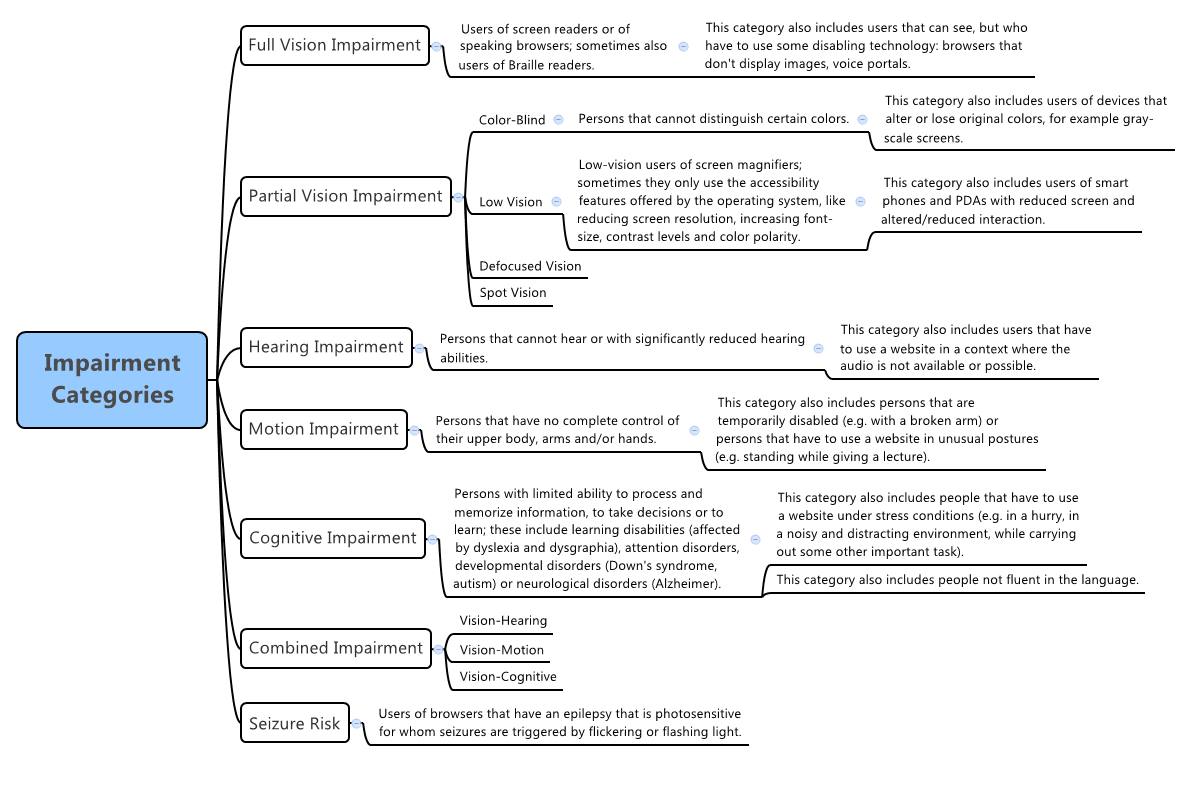
Learn what accessibility testing is and discover why it is needed:
EXERCISE
[1 hour] Developing an accessible product requires commitment from the entire development team, not just the tester. To share your new found appreciation of the impact of accessibility, challenge your team to spend 30 minutes without a mouse. As well as day to day work, ask them to check out the applications you develop. Afterwards, reflect as a team on the difficulties you encountered and the number of changes required to make your applications more accessible.


STEP - Accessibility standards

These formal documents are relatively difficult to read exhaustively, but it's worth browsing through the standards to get an understanding of what they contain so they can be used as a reference:
EXERCISE
[30 mins] Can you locate information in the standards to answer the following questions:
  1. What is the minimum contrast for large scale text?
  2. What are the restrictions for time limited content e.g. form submission timeout?
  3. If an error is automatically detected, what are the accessibility considerations for displaying error messages?


STEP - Accessibility testing heuristics and strategy

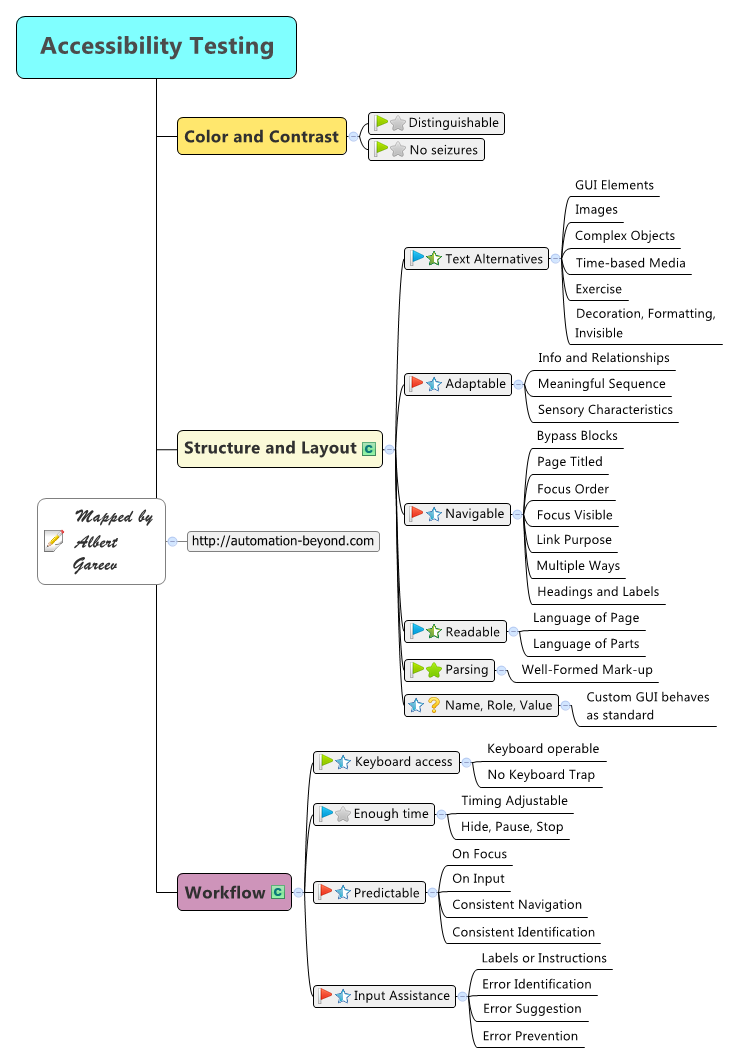
Investigate how we test whether applications are compliant. These practical resources include heuristics, mnemonics, test strategy, demonstrations, etc.
EXERCISE
[2 hours] Select a set of heuristics or test ideas that appeal to you. Talk to your business analyst or business lead about which aspects of accessibility they feel are most important. Conduct a 60 minute tool-free accessibility tour of the application that you work on, prioritising the testing that your business representative indicated. Note any problems that you encounter. Share the results of your tour with the same person and discuss how improvements to accessibility might be incorporated into your development process.


STEP - Accessibility testing tools

Learn about the tools that are available to help test accessibility in applications:
EXERCISES
[2 hours] There are a lot of tools to help assess accessibility properties of a site, many of which integrate within the browser. Evaluate the tools on offer and discover which you prefer. Compare the results of the automated assessment against the results of your own accessibility tour. What type of problems did the tool discover that you missed? What type of problems did you discover that the tool missed?

[2 hours] Download and trial the JAWS screen reader. See which areas of your applications perform well, and which are incomprehensible. Discover the main features of JAWS and learn how to navigate our sites as a non-sighted person would.


STEP - Developing accessible software

Tips to develop an accessible application, to prevent problems before they are caught by testing:
EXERCISE
[1 hour] Talk to the developers in your team about the techniques that they use to write accessible applications. Share what you've learned and investigate together whether there are any changes that could be made to development to help improve accessibility.


STEP - What is usability?

An introduction to usability and some short experiences from testers:
EXERCISE
[1 hour] To cement your understanding of the basic principles of usability testing, explain the concept to another tester.


STEP - Usability testing with real users

Discover different methods for tackling usability testing with real users of your software, from structured user sessions to guerilla usability testing:
EXERCISE
[4 hours] Talk to a user experience specialist about how customer sessions are run in your organisation. Attend some customer sessions and observe. Debrief with the user experience specialist about the process for seeking customer input and the feedback that was provided. Reflect on these experiences and try to align your approach to the theory and experiences you've read.


STEP - Usability testing for testers

Read about some techniques for performing preliminary usability testing within your development process:
EXERCISE
[2 hours] Select a resource that you'd like to try. Conduct a 60 minute usability test session of the application that you work on. Note any problems that you encounter. Discuss your approach and the validity of your results with your user experience specialist. Reflect on where opportunities exist for you to improve your development process to create a more usable application.


STEP - Agile accessibility & usability

How can we effectively embed accessibility and usability in our agile development process:
EXERCISE
[1 hour] Discuss with your team how your Definition of Done could be altered to reflect accessibility and usability requirements. Determine the importance of these attributes as a group and make a shared commitment to considering them, to whatever degree you are comfortable, in future work.


STEP - Mobile accessibility & usability

There are different tools and user expectations for accessibility and usability on mobile:
EXERCISE
[1 hour] Switch on some of the accessibility features of your mobile handset, e.g. inverted colours, voice over, larger font sizes, etc. Complete a simple tour of the features in one of your mobile applications. Note any problems you encounter in using the application with these accessibility options enabled. If possible, compare your experience on an Apple handset vs. and Android handset.


STEP - Introduction to user experience

Testing supports a positive user experience with your application. Read through the basics of user experience and learn about how user experience is distinguished from other terms:
EXERCISE
[30 mins] Chat to your designers about their views on user experience. Discover what they want your customers to say when they use your products. Discuss how testers can support the UX vision.

Friday, 21 August 2015

Mobile Testing Pathway

This pathway is a tool to help guide your self development in mobile testing. It includes a variety of steps that you may approach linearly or by hopping about to those that interest you most.

Each step includes:
  • links to a few resources as a starting point, but you are likely to need to do your own additional research as you explore each topic.
  • a suggested exercise or two, which focus on reflection, practical application and discussion, as a tool to connect the resources with your reality.

Take your time. Dig deep into areas that interest you. Apply what you learn as you go.


STEP - Mobile testing ideas using checklists & mnemonics

When testing mobile applications, we need to switch our thinking. When planning our testing, instead of generating functional ideas about how the software works we should think of mobile-specific test ideas. This change in thinking will test the unique aspects of mobile while also covering the functionality of the application through a different lens.

There are a number of practical resources to help generate test ideas for mobile applications:

EXERCISE
[2 hours] Select a mobile application. Spend 30 minutes using these resources to come up with a set of test ideas for the application you have chosen. If you're unfamiliar with the application you may need to explore its features in parallel to generating test ideas, but try to tour rather than test. Once you have a set of ideas, spend 30 minutes testing the application. Prioritise execution of the mobile test techniques that you have never tried before. Note any questions you have or problems that you discover. After you complete your testing, spend 30 minutes debriefing with a mobile tester. Discuss your plan, your testing and what you discovered; ask questions and develop your understanding.

This is a good exercise to repeat against different mobile applications as you progress through this pathway. Practice makes perfect.


STEP - Mobile test approach

At a level above test ideas, the mobile tester has to develop an approach to the problem of testing an application. Learn more about how other people test, and get a broader understanding of the challenges and considerations of testing on mobile:

EXERCISE
[1 hour] Reflect on the articles you have read and research any areas that you're interested in learning more about. Consider whether there are any gaps in the checklists and resources to generate test ideas based on these new resources. Look back at your previous mobile testing, how would you re-prioritise your activities now that you have a slightly broader understanding of the approach to mobile?


STEP - Device fragmentation

Device fragmentation is a common challenge in mobile testing. The number of physical handsets and diversity in mobile operating systems means that there are a large number of different devices that could be running your mobile application.

Here are some starter posts that illustrate device fragmentation and explain the problems it creates:

EXERCISE
[1 hour] Find a copy of your latest organisation analytics pack to understand device fragmentation in your customer base. Look at the differences in device use between different mobile applications offered by your organisation, and between your responsive public website and mobile applications. Which devices do you think you should test against in each area? Once you have done some research, take your lists to someone in your mobile team. Discuss how analytics drive decisions about device fragmentation.


STEP - Emulators

One of the ways we can tackle device fragmentation is through the use of emulators. There are pros and cons to using emulators instead of real devices. Get some insight into the arguments and use a common emulator:

EXERCISE
[1 hour] Access a responsive public website using the Chrome dev tools device mode. Investigate the features of the emulator, see which aspects of mobile it represents effectively, and identify cases where the emulation fails to reflect reality. As you investigate the site across different devices and resolutions, note any problems that you discover. In addition to test coverage of the site, try to explore all the options of the emulator tool bar.


STEP - Mobile automation strategy

Another response to device fragmentation and the rapid pace of mobile development is the use of automation. Here are some varying opinions on what types of automation are useful and why you might use them:

EXERCISES
[2 hours] Spend some time investigating the mobile automation in place for the iOS and android versions of an existing mobile application in your organisation. Read any associated documentation for these suites, or overviews of how they work. To get closer to the code and see it in action, ask someone to give you a demonstration.

[1 hour] The "device wall of awesome" is an ambitious goal for mobile continuous integration. Investigate which continuous integration practices are currently in place for your mobile applications. Research some other options for continuous integration in mobile. Talk to your mobile team and share your ideas.


STEP - Testing mobile design

There are significant differences between web and mobile user interfaces with design for mobile devices considering smaller screen size, environments for use, etc.

Here are some starter posts for mobile design and usability:

EXERCISE
[2 hours] Considering the devices that you test against, apply a thumb zone heat map to one of the screens, in one of your mobile applications, for each device. Look at the placement of your user interface elements within the map. How has the design considered the placement of widgets to accommodate use of the application on different devices? Take your maps to a mobile designer, talk about what you've discovered and learn about the other design considerations for mobile.


STEP - Mobile First

We talk about becoming "mobile first", but what does that actually mean and how will we implement it?

EXERCISE
[1 hour] Reflect on what you've read and consider how "mobile first" might alter your existing development approach. Talk to a someone who sets strategy in your organisation, share your thoughts and discover their opinions about what "mobile first" will mean for you.


STEP - Wearables

The release of the Apple Watch has accelerated the growth of wearable technology. In this emerging field there are interesting opinions about the influence of wearables:

EXERCISE
[2 hours] Find out whether your organisation has an application for Apple Watch, what features are included, how many people use it, who developed it, and how it has been tested. Try and find somebody with your application installed on their very own Apple Watch!


STEP - Screen capture, mirroring & recording

Tools that capture the screen may be useful, especially in situations where a bug is observed by cannot be reproduced. There are a number of tools available:

EXERCISE
[2 hours] Try installing some of these tools. Explore their functionality. Determine whether there are any that you prefer. Talk to someone in your mobile team about which tools they prefer and why.


STEP - A/B testing on mobile

A/B testing is a method for testing in production where we present alternate builds to our users and use the data about the differences in how people react to each build to make informed decisions on what changes to make or keep:

EXERCISE
[2 hours] Talk to someone in your organisation to find out more about how you've used A/B testing within your applications. Discover application flags and how you interpret user analytics. Talk to the a designer to learn about the situations they might recommend as appropriate for A/B testing in mobile. Talk to someone in your mobile team about how they've used A/B testing within your mobile applications in the past.


STEP - Performance & Stress

As in your desktop applications, performance on mobile is important.

EXERCISE
[1 hour] Talk to someone in your mobile team about how they deal with performance and stress testing now. Based on what you've read, share any ideas you have on how the process might be improved.


STEP - Following the future

Mobile testing is a vibrant field with new articles and trends emerging regularly. Here are some suggestions of people to follow on Twitter who are active in mobile testing: